• Home
  • Remote Education Assistance
  • Class Video Links
  • Computers and your family
  • About
  • Video Links

Steve Simpson, Glendale College Computer Instructor

~ Designed For My Students, Friends and Family!

Steve Simpson, Glendale College Computer Instructor

Category Archives: Family info

Zenbo

25 Monday Jul 2016

Posted by simpsongcc in Family info, For Fun, Future Technology, GCC, Integrated Technology, New Technology

≈ Leave a comment


A new robot worth watching!

Zenbo

Students can get a free Xbox One with a Surface Pro 4

30 Thursday Jun 2016

Posted by simpsongcc in Family info, For Fun

≈ Leave a comment


Students can get a free Xbox One with a Surface Pro 4

Meet the Smartest, Cutest AI-Powered Robot You’ve Ever Seen

28 Tuesday Jun 2016

Posted by simpsongcc in Family info, For Fun, Future Technology, GCC, Integrated Technology, Intro to Computers, New Technology

≈ Leave a comment


Meet the Smartest, Cutest AI-Powered Robot You’ve Ever Seen

12 Netflix Hacks You Aren’t Using (But Should Be)

13 Monday Jun 2016

Posted by simpsongcc in Family info, For Fun, Mobile

≈ Leave a comment


12 Netflix Hacks You Aren’t Using (But Should Be)

Slimmer Xbox One S does 4K and HDR, brings 2TB storage, new controller Read more: http://www.digitaltrends.com/gaming/xbox-one-s-images-leaked/#ixzz4BV4xH8rr Follow us: @digitaltrends on Twitter | digitaltrendsftw on Facebook

13 Monday Jun 2016

Posted by simpsongcc in Family info, For Fun, Future Technology, New Technology, Windows 10

≈ Leave a comment


Slimmer Xbox One S does 4K and HDR, brings 2TB storage, new controller

ASUS’ $599 home robot is smarter than it looks

06 Monday Jun 2016

Posted by simpsongcc in Family info, For Fun, Future Technology, GCC, Integrated Technology, Intro to Computers, Mobile, New Technology, Security Issues

≈ Leave a comment


ASUS’ $599 home robot is smarter than it looks

Inhabitat’s Week in Green: The first freeform 3D-printed house

06 Monday Jun 2016

Posted by simpsongcc in Family info, Future Technology, New Technology

≈ Leave a comment


Inhabitat’s Week in Green: The first freeform 3D-printed house

Tech camps for girls: Don’t let your daughter miss out

01 Wednesday Jun 2016

Posted by simpsongcc in Family info, GCC

≈ Leave a comment


Tech camps for girls: Don’t let your daughter miss out

How to recognize phishing email messages, links, or phone calls

19 Tuesday Apr 2016

Posted by simpsongcc in Family info, GCC, Integrated Technology, Internet, Intro to Computers, Outlook, Security Issues

≈ 1 Comment


Here is a nice little article from Microsoft….

Phishing email messages, websites, and phone calls are designed to steal money. Cybercriminals can do this by installing malicious software on your computer or stealing personal information off of your computer.

Cybercriminals also use social engineering to convince you to install malicious software or hand over your personal information under false pretenses. They might email you, call you on the phone, or convince you to download something off of a website.

What does a phishing email message look like?

Here is an example of what a phishing scam in an email message might look like.

What is phishing

  • Spelling and bad grammar. Cybercriminals are not known for their grammar and spelling. Professional companies or organizations usually have a staff of copy editors that will not allow a mass email like this to go out to its users. If you notice mistakes in an email, it might be a scam. For more information, see Email and web scams: How to help protect yourself.
  • Beware of links in email. If you see a link in a suspicious email message, don’t click on it. Rest your mouse (but don’t click) on the link to see if the address matches the link that was typed in the message. In the example below the link reveals the real web address, as shown in the box with the yellow background. The string of cryptic numbers looks nothing like the company’s web address.

    Phishing scams masked web address

    Links might also lead you to .exe files. These kinds of file are known to spread malicious software.

  • Threats. Have you ever received a threat that your account would be closed if you didn’t respond to an email message? The email message shown above is an example of the same trick. Cybercriminals often use threats that your security has been compromised. For more information, see Watch out for fake alerts.
  • Spoofing popular websites or companies. Scam artists use graphics in email that appear to be connected to legitimate websites but actually take you to phony scam sites or legitimate-looking pop-up windows. For more information, seeAvoid scams that use the Microsoft name fraudulently.

    Cybercriminals also use web addresses that resemble the names of well-known companies but are slightly altered. For more information, see Protect yourself from cybersquatting and fake web addresses.

Beware of phishing phone calls

Cybercriminals might call you on the phone and offer to help solve your computer problems or sell you a software license. Neither Microsoft nor our partners make unsolicited phone calls (also known as cold calls) to charge you for computer security or software fixes.

Once they’ve gained your trust, cybercriminals might ask for your user name and password or ask you to go to a website to install software that will let them access your computer to fix it. Once you do this, your computer and your personal information is vulnerable.

Treat all unsolicited phone calls with skepticism. Do not provide any personal information.

For more information, see Avoid tech support phone scams.

Report phishing scams

If you receive a fake phone call, take down the caller’s information and report it to your local authorities.

  • In the United States, use the FTC Complaint Assistant form.
  • In Canada, the Canadian Anti-Fraud Centre can provide support.
  • In the United Kingdom, you can report fraud as well as unsolicited calls.

Whenever you receive a phone call or see a pop-up window on your PC and feel uncertain whether it is from someone at Microsoft, don’t take the risk. Reach out directly to one of our technical support experts dedicated to helping you at theMicrosoft Answer Desk. Or you can simply call us at 1-800-426-9400 FREE or one of our customer service phone numbers for people located around the world.

You can use Microsoft tools to report a suspected scam on the web or in email.

  • Internet Explorer. While you are on a suspicious site, click the gear icon and then point to Safety. Then click Report Unsafe Website and use the web page that is displayed to report the website.
  • Outlook.com (formerly Hotmail). If you receive a suspicious email message that asks for personal information, click the check box next to the message in your Outlook inbox. Click the arrow next to Junk and then point to Phishing scam.
  • Microsoft Office Outlook 2010 and 2013. Right-click the suspicious message, point to Junk, and then click Report Junk.

You can also download the Microsoft Junk E-mail Reporting Add-in for Microsoft Office Outlook.

Tickets for JPL public weekend available April 25

19 Tuesday Apr 2016

Posted by simpsongcc in Family info, For Fun, GCC, New Technology

≈ Leave a comment


Tickets will be available Monday, April 25 for JPL’s new approach to the one special weekend a year when it opens its doors to the public.

“A Ticket to Explore JPL,” so named to distinguish it from traditional Open Houses, will take place the weekend of June 4-5.

Tickets are free but limited, and will be distributed on a first-come, first-served basis. The ticket requirement applies to JPL employees as well as the public, but not to those working at the event or entering the Lab for normal work shifts.

Tickets will be available Monday, April 25 at 9 a.m. on JPL’s Special Events web page. Visitors may request to enter JPL on the half-hour between 8:30 a.m. and 1 p.m., based on availability.

The maximum number of tickets per family is five. All entering JPL to attend the event must have tickets in hand, and those age 18 or older must show a matching ID. Tickets are not transferable.

A short video explaining the ticketing is viewable at http://www.jpl.nasa.gov/events/open-house.php.

Setting up a local user account in Windows 10

30 Wednesday Mar 2016

Posted by simpsongcc in Family info, GCC, Security Issues, Windows 10

≈ Leave a comment


Nice video to help set up a Windows 10 account and a kid’s account

Setting up a local user account in Windows 10

Adding a child user account in Windows 10

Use your phone to make that payment

25 Monday Jan 2016

Posted by simpsongcc in Family info, GCC, Integrated Technology, New Technology, Security Issues

≈ Leave a comment


Your phone is a more secure form of payment than your credit card. Here is a quick video.

Pay with your phone

Virtual and Augmented Reality

19 Tuesday Jan 2016

Posted by simpsongcc in Family info, For Fun, Future Technology, GCC, Integrated Technology, Internet, Intro to Computers, New Technology

≈ Leave a comment

Tags

New Tech


You are going hear and see a lot about these this year. Here are the headsets to look at…

Oculus Rift

Samsung Gear VR

Google Cardboard

Microsoft HoloLens

HTC Vive

Sony PlayStation VR

New Interesting Home Robot

19 Tuesday Jan 2016

Posted by simpsongcc in Family info, For Fun, Future Technology, GCC, Integrated Technology, Intro to Computers, New Technology, Security Issues

≈ Leave a comment


Here is the website for a new, very interesting home robot. A definite step forward!

Aido Robot

Best Antivirus Utilities for 2016

14 Thursday Jan 2016

Posted by simpsongcc in Family info, GCC, Security Issues

≈ Leave a comment


Here is the PC Mag review for best Antivirus programs

PC Mag Review

Keeping Your Child Safe On The Internet

14 Monday Dec 2015

Posted by simpsongcc in Family info, GCC, Security Issues

≈ Leave a comment

Tags

GCC, Security


Another article to take a look at if you have kids….

10 Ways to keep your child safe

Tech Toys can be dangerous to your kids

14 Monday Dec 2015

Posted by simpsongcc in Family info, GCC, New Technology, Security Issues

≈ Leave a comment

Tags

GCC, Security


Here is an important article to read this holiday season. It has some important things to consider if you have kids.

Tech Toys

Mattel and Google teamed up to make VR kid friendly, and they got pretty darn close

05 Monday Oct 2015

Posted by simpsongcc in Family info, For Fun, New Technology

≈ Leave a comment

Tags

New Tech


I have to say I saw this device several months ago and I was very impressed. They kept the feel of the original Viewmaster yet added basic VR to it. I thought it was very cool. The price point is amazing. I’d recommend taking a look. Even adults who fondly remember this device will get a kick out of it!

http://venturebeat.com/2015/10/04/mattel-and-google-teamed-up-to-make-vr-kid-friendly-they-got-pretty-darn-close/

8 little-known security tricks that will make you harder to hack

11 Thursday Jun 2015

Posted by simpsongcc in Family info, Security Issues

≈ Leave a comment

Tags

Security


Good article for employing some simple things to increase your security.

http://www.msn.com/en-us/news/itinsider/8-little-known-security-tricks-that-will-make-you-harder-to-hack/ar-BBklM0P#page=1

Best wireless routers of 2015

18 Monday May 2015

Posted by simpsongcc in Family info, Integrated Technology, Internet, New Technology, Security Issues

≈ Leave a comment

Tags

New Tech, News, Security


Here is a CNET review of the best wireless routers in 2015 so far…..

Best wireless routers of 2015

Update to my Computers and your family page

18 Thursday Sep 2014

Posted by simpsongcc in Family info

≈ Leave a comment


I have put some great new info up on the Computers and Your Family page. The link is at the top of my site. Hopefully it is helpful!

Plan now for the JPL Open House

26 Thursday Jun 2014

Posted by simpsongcc in Family info, Future Technology, Job Hunting?, New Technology
≈ Leave a comment


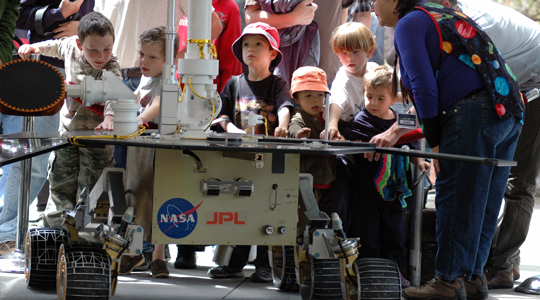
openhouse2011-1-540

“NASA’s Jet Propulsion Laboratory, Pasadena, California, invites the public to its annual Open House. The event, themed “Welcome to Our Universe,” will take visitors on a “ride” through the wonders of space. Highlights include a life-size model of Mars Science Laboratory, demonstrations from numerous space missions; JPL’s machine shop, where robotic spacecraft parts are built; and the Microdevices Lab, where engineers and scientists use tiny technology to revolutionize space exploration……”

The Link is: http://www.jpl.nasa.gov/events/open-house.php

Teens Rebelling Against Facebook

08 Thursday May 2014

Posted by simpsongcc in Family info

≈ Leave a comment


For those parents out there, her is some interesting info.

http://www.bing.com/r/1E/s3gq9?a=1&m=EN-US

Newer posts →

This slideshow requires JavaScript.

Follow Steve Simpson, Glendale College Computer Instructor on WordPress.com

Hours & Info

818-813-1720
ssimpson@glendale.edu
April 2026
M T W T F S S
 12345
6789101112
13141516171819
20212223242526
27282930  
« Mar    

Categories

Archives

Follow Steve Simpson, Glendale College Computer Instructor on WordPress.com

A WordPress.com Website.

  • Subscribe Subscribed
    • Steve Simpson, Glendale College Computer Instructor
    • Join 81 other subscribers
    • Already have a WordPress.com account? Log in now.
    • Steve Simpson, Glendale College Computer Instructor
    • Subscribe Subscribed
    • Sign up
    • Log in
    • Report this content
    • View site in Reader
    • Manage subscriptions
    • Collapse this bar
 

Loading Comments...